


Free Download

Download Picture Collage Maker for Windows Now!

Awards
Testimonials
 This is a very nice and useful photo collage generator.
- Soft32
Really a great collage software ! Very, very fast and simple.
- Benjamin Glettenberg
Find Us
Collage Frame Tips
Collage Frames are used to decorate the border of the photos. In the frame list, a variety of frames are provided. They are basically sorted into Picture Collage Frame and Color Collage Frame.
Picture Collage Frame
Open the Picture Frame Pane, you can see the list of frames in the left part of Picture Collage Maker window. You can choose the necessary styles from the drop-down menu. In the Frames Thumbnails Pane, apply collage frames to photo by double clicking or dragging.

Color Frame
In the left pane of main window, choose Color Frame and the list of color frames are shown.
- 1. Add color frame: Click on Add Button to add frames of any color according to your will.
- 2. Edit color frame: The width and color of the frame can be edited in the Color Frame dialog box. Choose a color frame in the frame list, click on Edit to change the width and color of it.
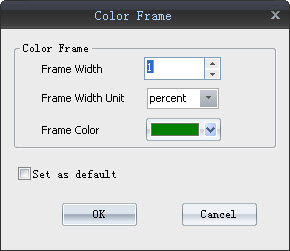
- 3. Delete color frame: If you want to delete a color frame in the frame pane, just choose it and click on the Delete button.
- 4. Default frame: If you want to set a color frame as default, the last button works. Choose a color frame and click the last button. Then setting the frame as default or clearing the default is a matter of clicking the option.
Notes on Remove Collage Frame
Right-click on the photo and choose Clear option, select Clear Frame and the work is done. Yet another method lies in the lower toolbar 'Clear' button, click on the drop-down button, and choose Clear Frame.
Frame and Mask Tips
The catch is that collage frames can only be applied to unmasked photo. Frame and mask can’t work simultaneously on the same photo. That means that if one effect is applied, the other one will vanish, and vice versa.
Picture Collage Maker is a powerful and easy-to-use photo collage maker for Mac OS X & Windows , which allows you to create photo collages, scrapbooks, greeting cards, posters and calendars to share with family and friends.
|
 |
 |